Around The World, Part 35: Sailing
This post is part of a series about Around The World, a game of exploration and discovery at sea. The game is currently in early development. If you're new to this project, you can read up on it here.
After all the procedural generation and visuals, we’re finally getting into game design and gameplay territory! And none too soon.
In Around The World, the player sails a fleet of ships across the sea. This sailing forms the innermost “game loop” if you will, so it’s important to get it right. How exactly does the player control the fleet? Bear in mind that the game uses a third-person “chase” camera hovering behind the player’s flagship.
In the prototype, it was a simple point-and-click interface as you’d see in RTS games: the player clicks, and the ship sails in a straight line to the clicked point. The prototype had no pathing logic; if the ship hit land, it would simply stop. This works well for a top-down 2D game, and could be done in 3D as well.
Navigation
In fact, this is how I originally implemented it: just right-click on a point (land or sea) and the ship will sail towards it… but with some subtleties because life at sea is never easy.
If you click on land, the ship will keep its bow pointed at that point and keep going until it has been reached.
If you instead click on water, the ship will sail to that point but continue on past it, letting you set a course into the open sea without having to keep clicking. In fact it will maintain a fixed compass bearing, but due to wind and currents this might not be the actual direction of movement! Information from charts can help you compensate for this, giving charts another use besides just finding the next port.
But what if there’s an island or other landmass in between? Would you need to click-click-click throughout the route to plot a course around it? That would be tedious. Rather, the ship should figure this out on its own using a pathfinding algorithm. I had this implemented, but it never felt quite right, not to mention that limitations (bugs?) in Godot’s navigation system caused the ship to behave weirdly and sail away from the goal sometimes.
The problem is that this approach, especially with automatic pathfinding, gives the player little control over how the ship sails there. What if there are obstacles along the way? One gameplay mechanic I would like to support is underwater hazards like reefs, sandbars and rocks; since these are hard to spot visually, you would need to use charts to avoid them. So maybe a more direct control scheme would be better.
Direct control
The obvious candidate for more direct control would be WASD keys, like in a first or third person shooter. (Personally, I prefer ESDF on qwerty layouts and .OEU on dvorak, but that’s a story for another time.) I quickly implemented this, and it just felt much more immersive and powerful than point-and-click control. This was a keeper!
But a ship is not a main character in a third-person shooter. For one, if you do nothing, a ship will keep moving whereas a person will stop. So there’s one important difference in the control scheme: you don’t have to hold down the up/forwards key to keep sailing; you just press it once to raise your sails, and off you go.
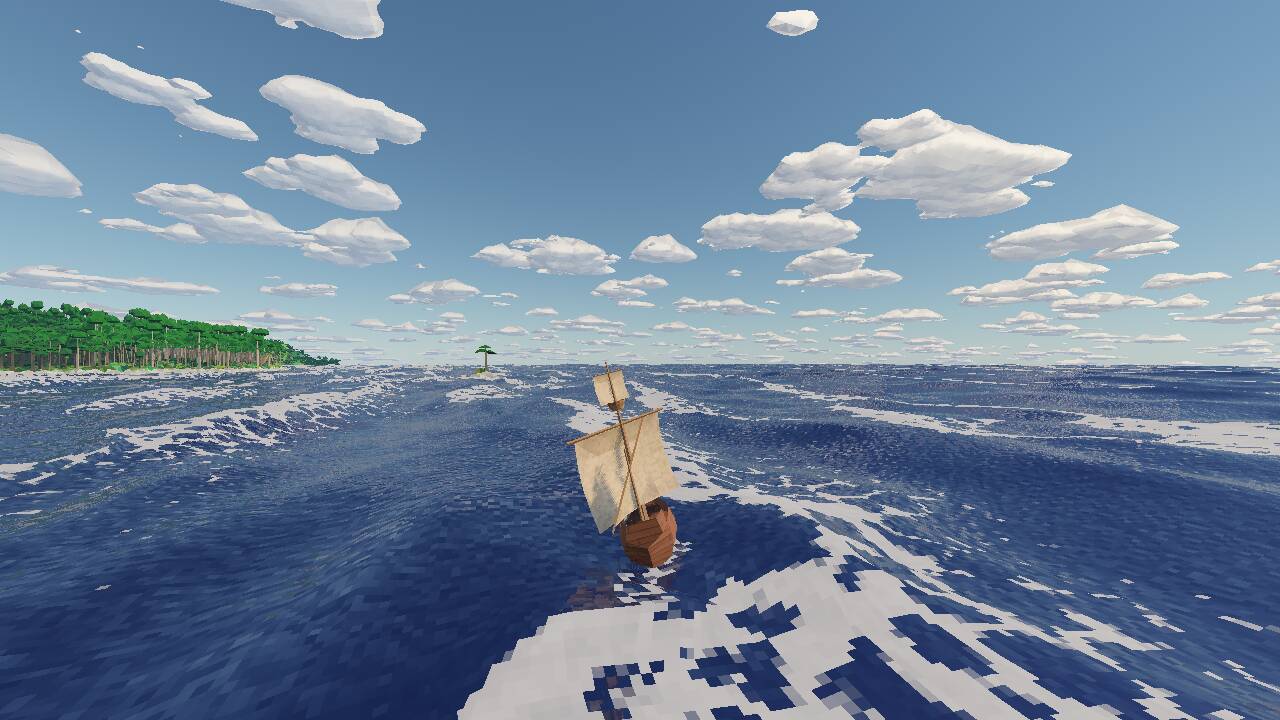
Another difference is that a sailing ship is driven by wind. I’m not yet changing its speed depending on the current wind direction, but that is definitely going to happen in a future update. For now, let’s at least make it look like the wind is propelling the ship:
- The sails move down when you start, and back up when you stop.
- The sails billow in the wind.
- The yard arms and attached sails turn depending on the wind and sailing direction.
- The ship leans over as if pushed by the wind.
There’s a video at the end, but here’s a screenshot of how that looks, with the wind coming from the right:
Wake
It had been bothering me for a long time that the ship doesn’t really look “grounded” in the water; it sort of seems to sit on top. On solid ground, there would be a contact shadow, but water rendering works differently. There is a reflection, which does help, but I can’t dial it up too far because the rest of the water starts to look strange.
So I figured I’d try something else to make it look like the ship is interacting with the water, and make it more “juicy” overall: a wake. It consists of two parts:
- The Kelvin wake which is the classic V-shaped “bow wave”. Fun fact: the angle of the V does not depend on the ship’s speed and is always 39°.
- The turbulent wake which is just a foam trail behind the ship. You always see these on motorized ships due to the churn of the propellor, and I’m not sure how appropriate it is to draw them behind a sailing ship, but it looks good so there you go.
Rendering these was easier said than done, since they have to be added into the existing water rendering. I ended up drawing both wakes as particles; the Kelvin wake as rings, the turbulent wake as pixelated sprites:
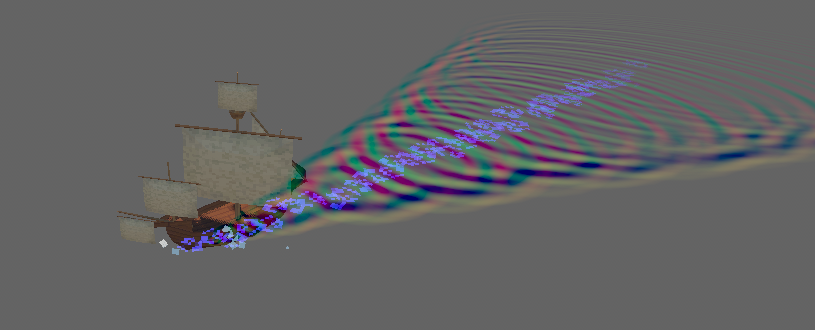
These are not visible in the regular viewport, but are instead rendered by a separate, orthographic camera that follows the ship and looks straight down. The result is rendered into a texture that looks like this:
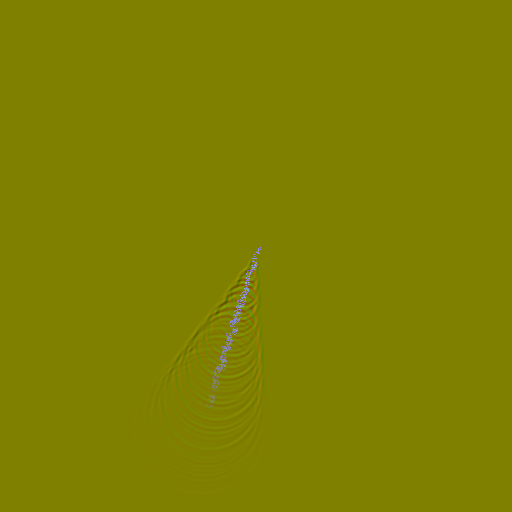
The colour channels of this texture have a special meaning, which is also why the base colour has to be such an ugly olive (#808000):
- The red and green channels contain the x and y coordinates of the normal map. The Kelvin wake particles additively draw to these channels.
- The blue channel contains the amount of foam. The turbulent wake particles draw to this channel.
The water shader then picks up this texture and applies it on top of the regular normal map and foam calculations. The result is a nice looking wake behind the ship:
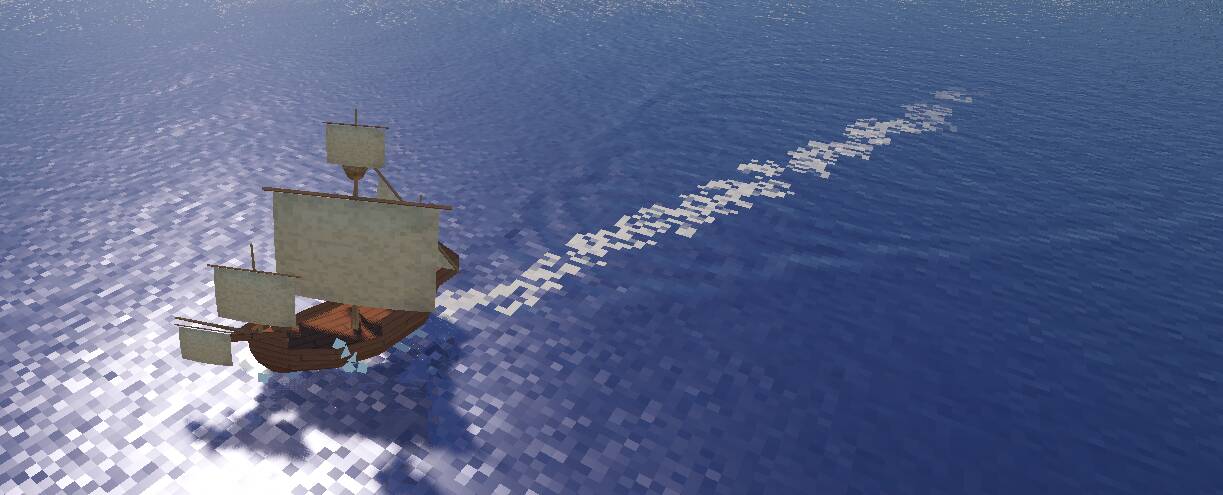
The fact that I’m using an intermediate texture of finite size means that wakes can’t be rendered everywhere; they will only be visible close to the player’s ship. But since distant water is not clearly visible anyway, this should not be a problem.
Warping time
Even though I’ve made the game world significantly smaller than the real world, it’s still a big place: 512 by 256 kilometers. A typical distance between two ports is about 10 kilometers, which cannot be shrunk much further without the world starting to feel small. It’ll be a significant game design challenge to keep travel time under control, and make travel not boring.
I’ve already made the player’s ship sail at Ludicrous Speed™: 50 m/s, which is 180 km/h, 112 mph, 97 knots. Any faster and it starts to feel silly. The speed is more or less correct because time passes 60× as fast in the game world, so the actual travel speed is about 3 km/h, which is quite slow for a carrack but at least the right order of magnitude.
However, even at this exaggerated speed, it still takes over three minutes to sail from one port to another. This is fine for a while, but started to get tedious even during my own testing. So I finally caved in, and added a time warp feature:

These buttons sit in the top left corner and allow you to speed up time by a factor of 2× or 4×. There’s also a pause button now, which took some messing around in Godot because not everything should be paused; for example, it’s rather important that the pause button itself keeps working.
With these done, I noticed that my day/night cycle was starting to bother me. When using 4× time warp, a full day lasts just 6 minutes, of which about half is daylight, so you quickly run into sunset and a potentially very dark night. This is intentional: on the open sea, depending on how certain you are that there is no land ahead, you might want to take a slight risk and save time by sailing through the night.
Near the coast, on the other hand, you’ll probably want to wait for dawn until you continue. So I added a button for that as well:

Working out when the sun rises took some gnarly math, and still isn’t entirely accurate, but close enough to be useful.
Interacting with ports
Initially, I had the buildings of each port placed in a semicircle, whose centre was on the coast. The other half of that circle was where the player would need to sail to interact with the port. It worked, but it was never quite clear where you needed to go and how close you would have to get. Worse, the circle’s centre would sometimes be placed a bit inland, making the part on water quite small, or placed at sea, making almost no buildings show up.
I finally fixed this by making ports consist of two locations, straddling the actual coastline wherever that coastline ends up being generated:
- The point around which buildings are placed. This is on a grid point in the global map, for which we can guarantee that it’s on land.
- The point that the player will interact with. This is also on a grid point in the global map, but this point is at sea, adjacent to the buildings point.
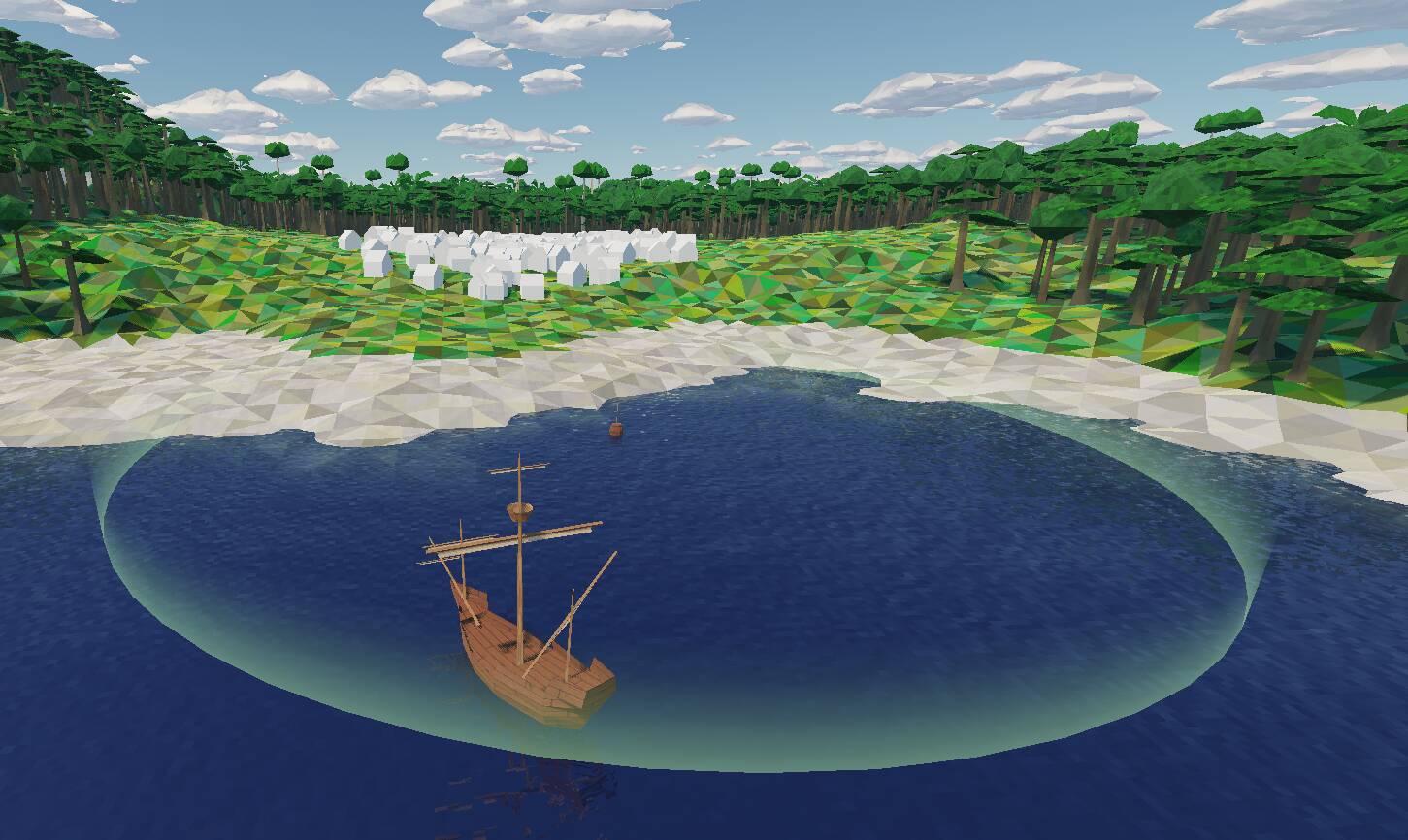
The interaction point is marked with a small buoy, surrounded by a halo to indicate how close you have to get. The halo does break realism, but I think this is warranted for gameplay clarity. Here’s what it looks like:
And that’s it for sailing mechanics.
Oh, I promised a video, right? Here you go.
Notice the wavelets behind the ship, the turning of the sails, and the lean of the ship when the wind blows from the side. I think it’s all starting to come together.